


Buy Coins for Oxide: Survival Island: HH ID, subscriptions and the Battle Pass
Oxide: Survival Island is a hardcore mobile survival game built around PvP, base-building and raids — essentially Rust reshaped for a phone. The iOS version launched on 11 August 2021, originally developed by Polish studio Catsbit Games. On 27 August 2025 the entire project was handed over to HYPERHUG LTD, and as of 2026 they ship updates, run the servers and process payments through shop.playoxide.com. The bundle ID com.catsbit.oxidesurvivalisland is still in place for historical reasons, but the App Store publisher field reads HYPERHUG LTD. The premium currency is Coins, and it pays for subscriptions, the Battle Pass, bundles and cosmetics.
- Six Coin packs from 50 to 3550 along the App Store ladder
- Premium and Prime subscriptions — two distinct 30-day tiers
- Elite and Elite+ Battle Pass for the current season
- Tickets — a separate farm currency for the Battle Pass and in-game perks
- Seasonal sets bundling cosmetics and boost effects
- Top-up by HH ID in the A1-B22-C33 format — no login needed
HH ID: how it differs from a regular UID
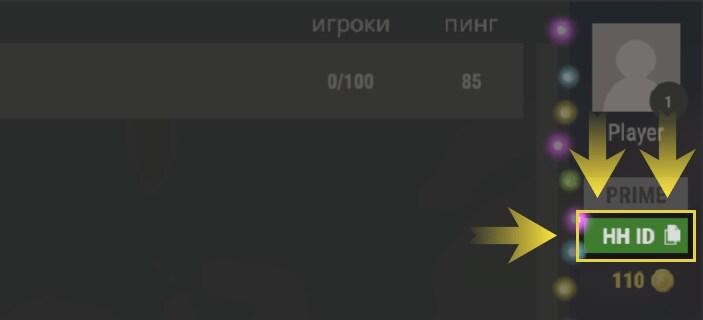
The account identifier in Oxide is called HH ID (HyperHug ID) and shows up on the main menu — tapping the ID block copies it to the clipboard. The format is alphanumeric, with three dash-separated segments along the lines of A1-B22-C33, not a long numeric string. That sets Oxide apart from most of the catalogue: if you are used to copying a numeric UID out of HoYo titles or Standoff 2, the logic here is different. The HH ID is shared across iOS, Android and PC emulators (BlueStacks, LDPlayer, MEmu) when you sign in through the same provider — Apple ID, Google or a Hyperhug login. It cannot be changed, so confirm the format before you hit pay.
Coins and Tickets are two parallel currencies, not one
Oxide runs two premium currencies, and they are not interchangeable. Coins are bought with real money (or earned through the referral programme described below) and spent on subscriptions, the Battle Pass and the cosmetic shop. Tickets are a farm currency that drops from activity, events and Battle Pass progression, and they go toward the Battle Pass itself plus a few in-game perks. There is no fixed 1:1 conversion between the two — they are not a soft/hard split of a single economy the way Primogems and Genesis Crystals work in Genshin. Coins and Tickets have different sources, different storefronts and different jobs. The App Store Coin ladder runs 50 / 135 / 290 / 630 / 1675 / 3550 priced from $1.99 to $99.99, and most third-party catalogues mirror that lineup.
Premium and Prime: do not mix the two subscriptions
This is the most common source of order mistakes. Premium Status is the entry-level paid tier, a 30-day pass that grants access to premium servers, queue skip on login, a unique nickname colour, +50% experience, +50% crafting speed and a 50% reduction on Tool Cupboard upkeep. That last bonus is not cosmetic — for PvP players running a sizeable base, the Tool Cupboard discount adds up across a long wipe cycle. Prime Status sits above Premium as the senior paid tier, with an extended set of perks. Hyperhug does not publicly aggregate the exact Prime numbers, so the catalogue describes Prime as "an extended set of perks on top of Premium" rather than listing specific multipliers. Both subscriptions are one-shot 30-day purchases tied to HH ID, not auto-renewing third-party billing — renewal means buying the next month manually.
Battle Pass: free, Elite and Elite+
The Battle Pass comes in three flavours: a free track, Elite (around $8.98) and Elite+ (around $17.98). Elite+ is roughly double the price of base Elite and stacks an additional reward layer on top of the regular premium track. The pool covers weapon and armour skins, themed building-block skins, Tickets, unique colour options and the occasional small Coin payout. Pass seasons run alongside the patch cycle rather than the calendar, so when a listing says "current season", it tracks the live update. Battle Pass progress is tied to HH ID, not to a server, which means it survives wipes — useful to know if you mostly play weekly servers.
Wipe schedules: what resets and what stays
Wipes are not a bug — they are the foundation of Oxide's design. Each server resets on a schedule so new players do not walk into a fully claimed map. Servers split into Weekly (reset every 7 days), Bi-weekly (every 14 days) and Modded servers with boosted gather rates such as EU 5X or Asia 10X, each with its own schedule. The exact next-wipe time is visible in the server browser: tap a server entry and the card shows creation date and the wipe timer. After a wipe everything resets — buildings, loot, server-side progress. What carries over: account level, cosmetics, clan ties, referral rewards and Battle Pass progress. All of those live on the HH ID rather than the server.
The referral programme: Coins for inviting friends
Oxide runs a fairly rare programme for the genre — Invite Friends & Earn Coins, documented at support.playoxide.com under "invite-friends-and-earn-coins". It pays out Coins for friends who join the game and meet the conditions, giving you a legitimate way to stockpile Coins without a purchase. The game also issues Loyalty Tickets for invites and event participation. Both are worth keeping in mind before you reach for the largest Coin pack — a chunk of the volume you need can come from playtime.
Three biomes and the Tool Cupboard: why Premium pays for itself
The map splits the island into three climate zones — cold, temperate and hot. They are not flavour: each biome demands a different armour set and a different gathering strategy, so you cannot park yourself in one zone and ignore the rest. That sets Oxide apart from Last Day on Earth and most mobile survivals, where weather is just background. The Tool Cupboard is the linchpin of any base: while it is fuelled, structures cannot be broken with regular tools — raiding requires explosives. Premium's 50% upkeep reduction on the Tool Cupboard saves a meaningful amount of resources across a bi-weekly cycle, which is why hardcore players buy Premium for that line item rather than for cosmetics. Recent QoL changes from 2025-26 include failed crafts now refunding part of the materials, larger hitboxes for better aim consistency, an optional "push joystick up to sprint" toggle and a tutorial map for new players.
EU, Americas and Asia: one island, three regions
The 2026 server map covers Europe, Americas (North and South) and Asia. The Asia region was added after the other two in response to community requests — before that, Asian players had to grind on EU or US with high ping. Beyond the official Vanilla servers there are Modded (x5, x10), Premium-only servers (active Premium status required) and Community/private servers hosted by players themselves. You pick a server per session, so you are not locked to one region forever, but progress on each server is local and resets on its own wipe timer.
How to place an Oxide top-up
- Open Oxide and tap your HH ID on the main screen — it copies automatically.
- Pick the pack you need: a Coin denomination, a Premium or Prime subscription, or a Battle Pass tier.
- Paste the HH ID in the A1-B22-C33 format into the order field.
- Double-check that the region and the product match your account.
- Pay the order — Coins, the status or the pass land on the linked HH ID.
Related top-ups on Brawl Games
- Last Day on Earth: Survival — a direct genre neighbour with PvP zones and base-building; the Oxide audience overlaps heavily.
- LifeAfter — NetEase's zombie survival with clans and co-op, in the same "serious survival on a phone" niche.
- Standoff 2 — Axlebolt's mobile hardcore PvP shooter with similar ID-based payment and seasonal passes.
- PUBG Mobile — the Battle Pass cadence and UC top-up flow are close cousins of Oxide's Elite/Elite+ structure.
The Brawl Games catalogue carries all six Coin denominations from 50 to 3550, the Premium and Prime subscriptions, Elite and Elite+ Battle Pass and seasonal bundles. Checkout takes the HH ID and the chosen server region; payment works for players in regions where shop.playoxide.com and the official Apple or Google channels have limited card support since 2022. The on-site chat is available before checkout for questions about a specific item or order status.